
The Scylla Framework for Unity has finally been released to general availability! This is a modular game development framework I’ve been focusing my work on since over nine months and is the result of my own ambitious idea of a game development framework that eventually will be able to take care of all the major aspects of modern game development.
The first three assets are now available on the Unity Asset Store:
Scylla Core



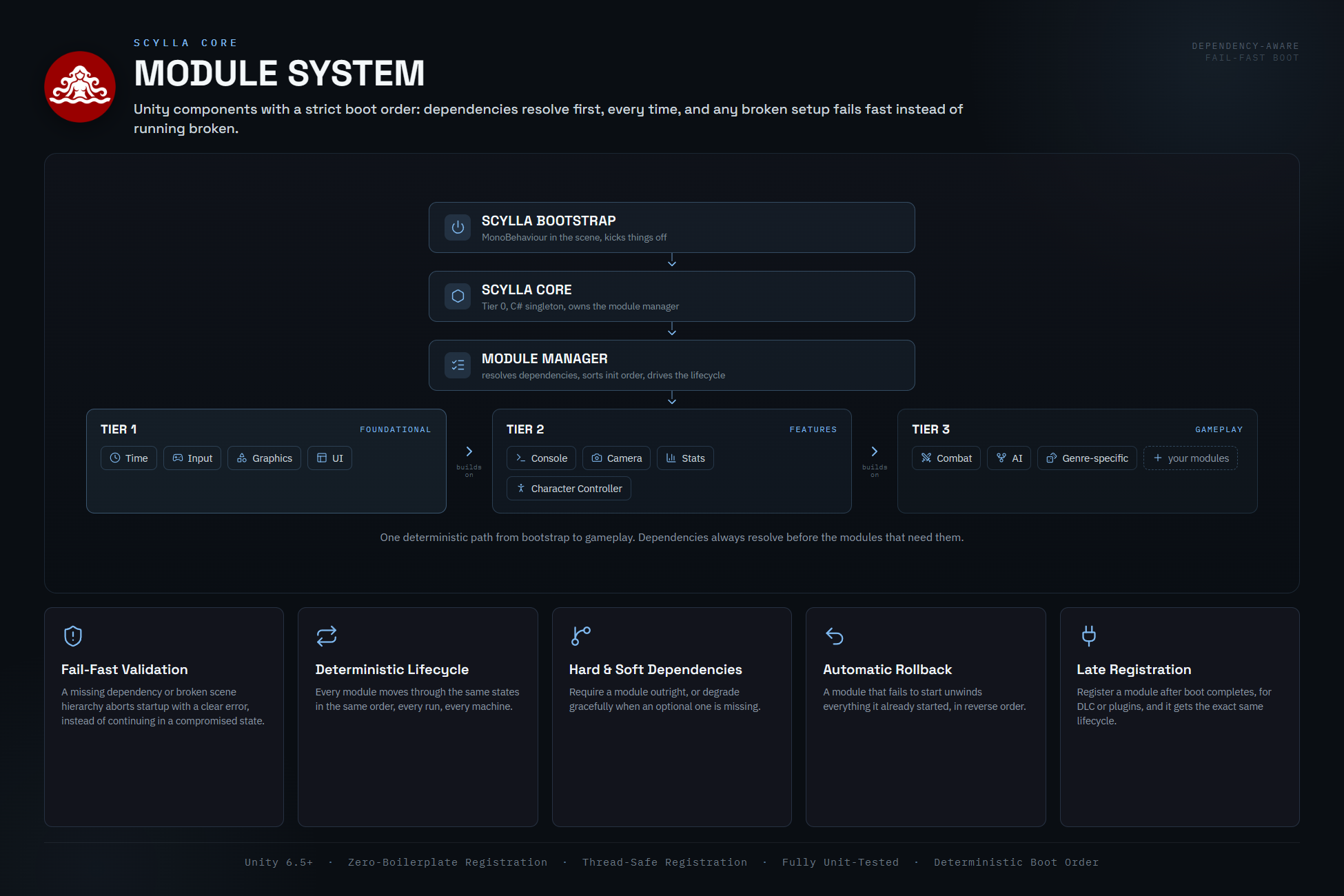
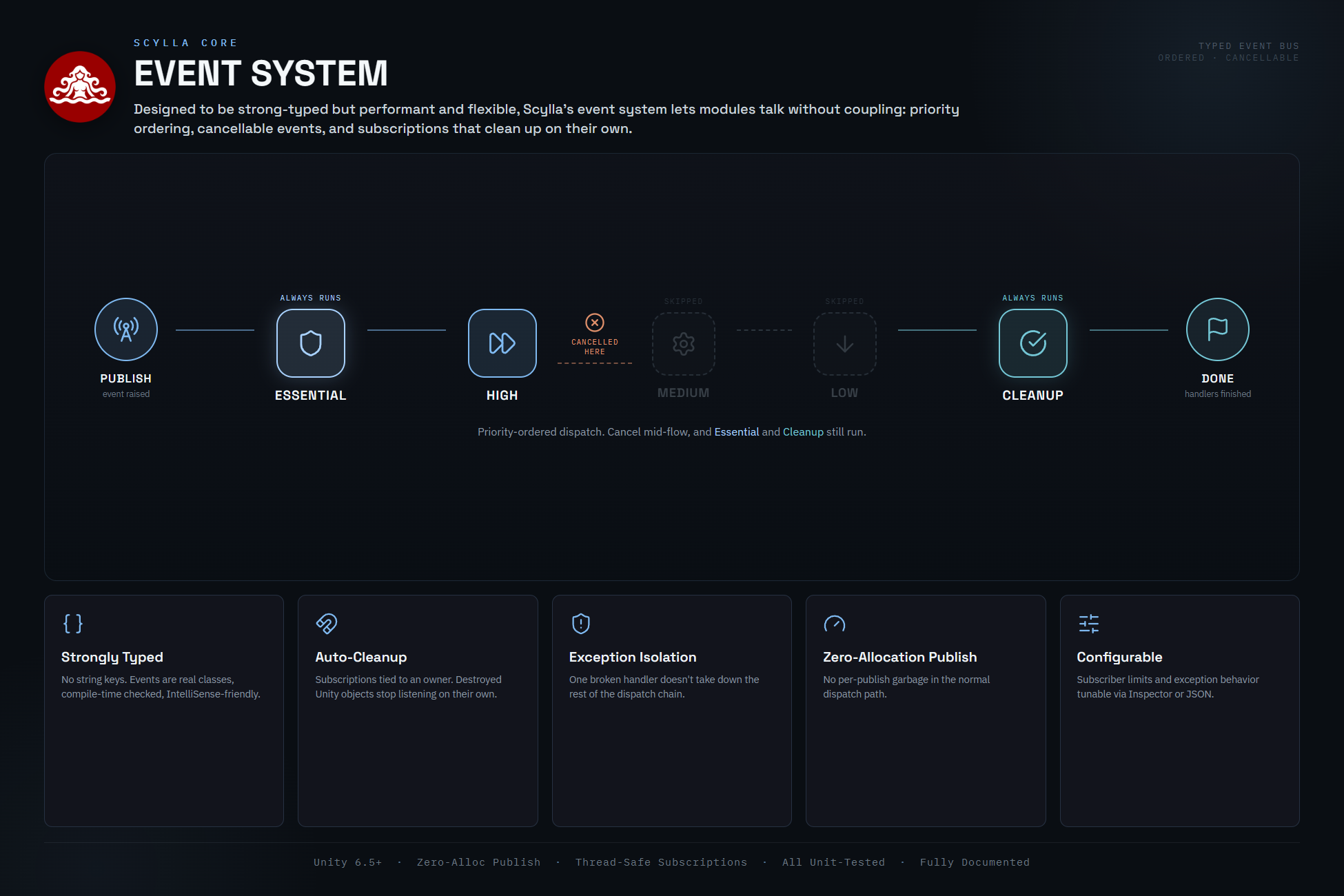

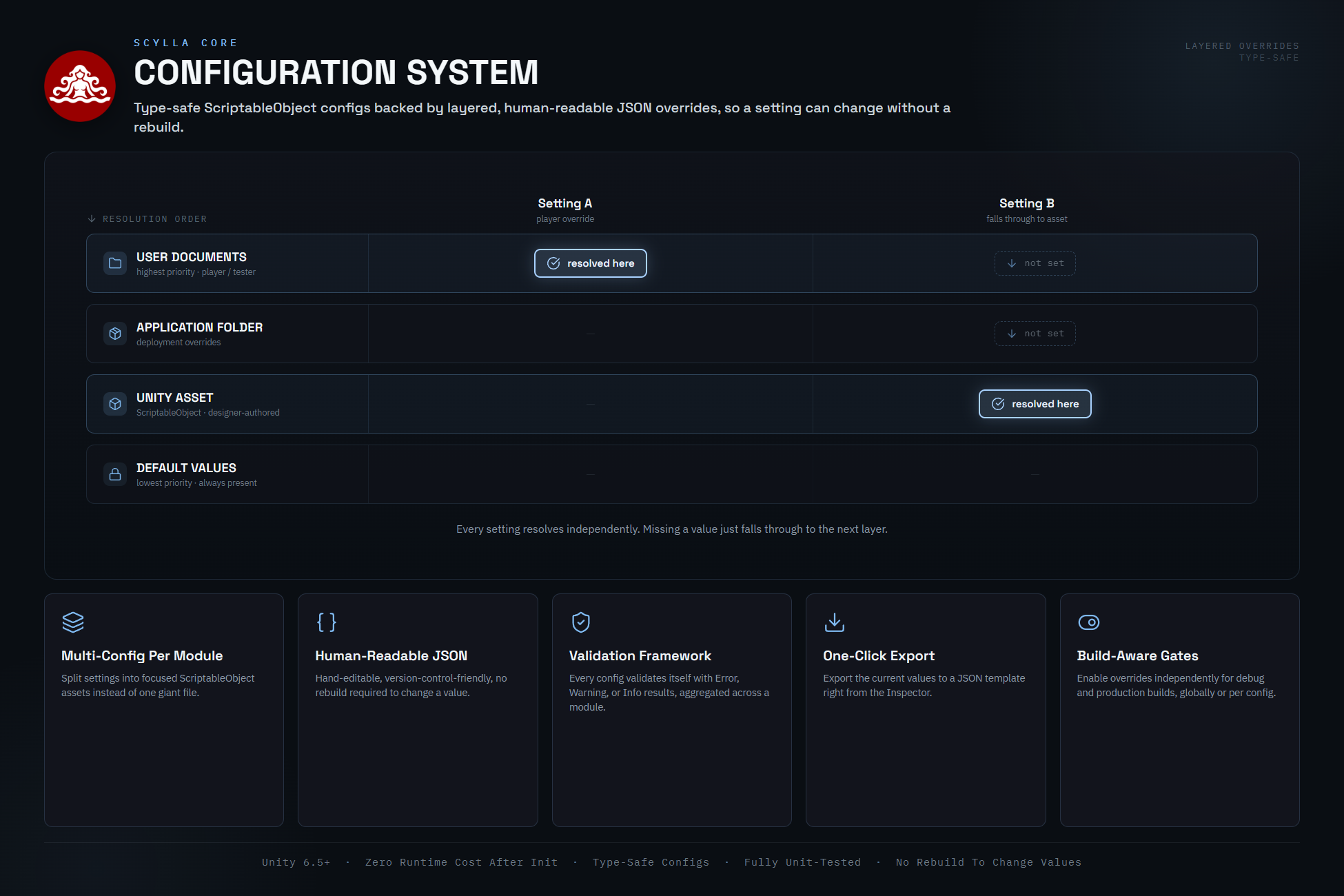


The core of the framework and a requirement for every following module and tool. It not only takes care of framework initialization and module management but also provides several core systems, collections, and utils required for just about anything:
- A strongly-typed event system with priority ordering and cancellation. It provides lifecycle-safe subscriptions that auto-clean up when Unity objects are destroyed.
- Centralized debug logging with category tagging, pluggable log receivers (Unity console and log files at start), and configurable log levels.
- The time system that features pause and time-scaling control with a clean API, deterministic time mode for replays and tests, as well as calendar math, tick scheduler, and time-scale modifiers.
- The scene manager that keeps the framework alive across scene loads and handles managed scene loading: single or additive, awaitable operations with progress and lifecycle events, optional Addressables-based scenes, and automatic transition hygiene that cleans up in-flight tweens, time-scale modifiers, and event subscribers between scenes.
- The config system which is used for all Scylla modules.
- A collection of high-performance data structures tailored for game development, including DOTS/Burst-compatible variants:
- Priority queue
- Deque
- Ring buffer
- Type map
- Bit array
- Disjoint set
- Object pool
- Trie
- Spatial structures:
- Quadtree
- Octree
- BVH
- KD-tree, including loose variants
- Graphs with traversal, MST, shortest path, and connected components
- Grid systems for square, hex, and triangle layouts
- A feature-rich utility library:
- Math utils: math and number utils with Approximately, Interpolation, Complex, Polynomial, Monomial.
- Procedural, deterministic noise generation: 6 algorithms (OpenSimplex2, Perlin, Value, ValueCubic, Cellular, Pixel) plus fractals, domain warping, and curl fields.
- Deterministic random utils: 5 pluggable algorithms (PCG32, Xoshiro256, Mersenne Twister, SplitMix64, Xoroshiro128+), dice rolls, Poisson disk sampling, seeded text / ID generation.
- Tween utils: full tween system with all standard easings, sequences, pooling, and extensions for Transform, Material, AudioSource, CanvasGroup, SpriteRenderer, RectTransform.
- Serialization utils: attribute-based JSON serializer with reference tracking, polymorphism, and version migration.
- Compression utils: GZip, Deflate, BZip2, ZipArchive (BZip2 and Zip optional via package gate).
- Cryptography utils: AES-CBC-HMAC, AES-GCM, ChaCha20-Poly1305, PBKDF2 key derivation.
- Checksum utils: Adler32, CRC16, CRC32, Fletcher32, XXHash32, XXHash64.
- File utils: path resolution, config files, image I/O.
- Procedural map generation: 9 algorithms (BSP, Cellular Automata, Drunkard Walk, Maze, Maze-with-Rooms, Room-and-Corridor, Voronoi Regions, Noise Threshold, Floorplan) with square, hex, and triangle grid support, plus L-shaped and winding corridor styles and post-processing for connectivity, dead-end removal, room detection, door and spawn placement.
- Debug draw utils: immediate-mode, mesh-based debug drawing of 2D and 3D shapes in world or screen space. Lines, polylines, circles, ellipses, rectangles, regular polygons, etc., with one-frame or timed-persistent draws. Auto-initializes with zero setup and batches into one mesh per frame.
- Geometry utils: geometric primitives (AABB, OBB, sphere, capsule, ellipse, 2D/3D sizes) plus a runtime procedural mesh library of 40+ parametric shapes: boxes, rounded boxes, spheres, ico-spheres, cylinders, cones, rings, pyramids, etc., plus level-building pieces like stairs, walls, and primitive props. Includes collider modes and palette-driven face coloring.
- UI utils: runtime UI scaffolding with DPI scaling, UI-layer helpers, canvas object creation and rebuild, and screen-space hit testing. Features a declarative layout system (HStack, VStack, ZStack, grid, adaptive and flex stacks, spacers, edge insets, aspect breakpoints) and efficient scrollable text areas ScrollTextArea and LineScrollTextArea.
- Addressable utils: optional (via package gate) unified wrapper over Unity Addressables covering loading, instantiation, scene load / unload, batch loads by label or key, dependency downloads, and catalog updates. Offers handle, try, modern async/await (Awaitable), and result-based forms with cancellation tokens, typed error codes, and RAII-style managed lifetime handles.
- … and a slew of other everyday-use utils like color utils, string utils, font utils, collection utils, interpolation, type utils, etc.
- Scylla color palettes and color gradients that go far beyond what Unity provides natively and that work with Scylla Chroma.
- Automatic conversion unit types: AreaUnit, LengthUnit, DataUnit, TemperatureUnit, TimeUnit, and more.
Scylla Input


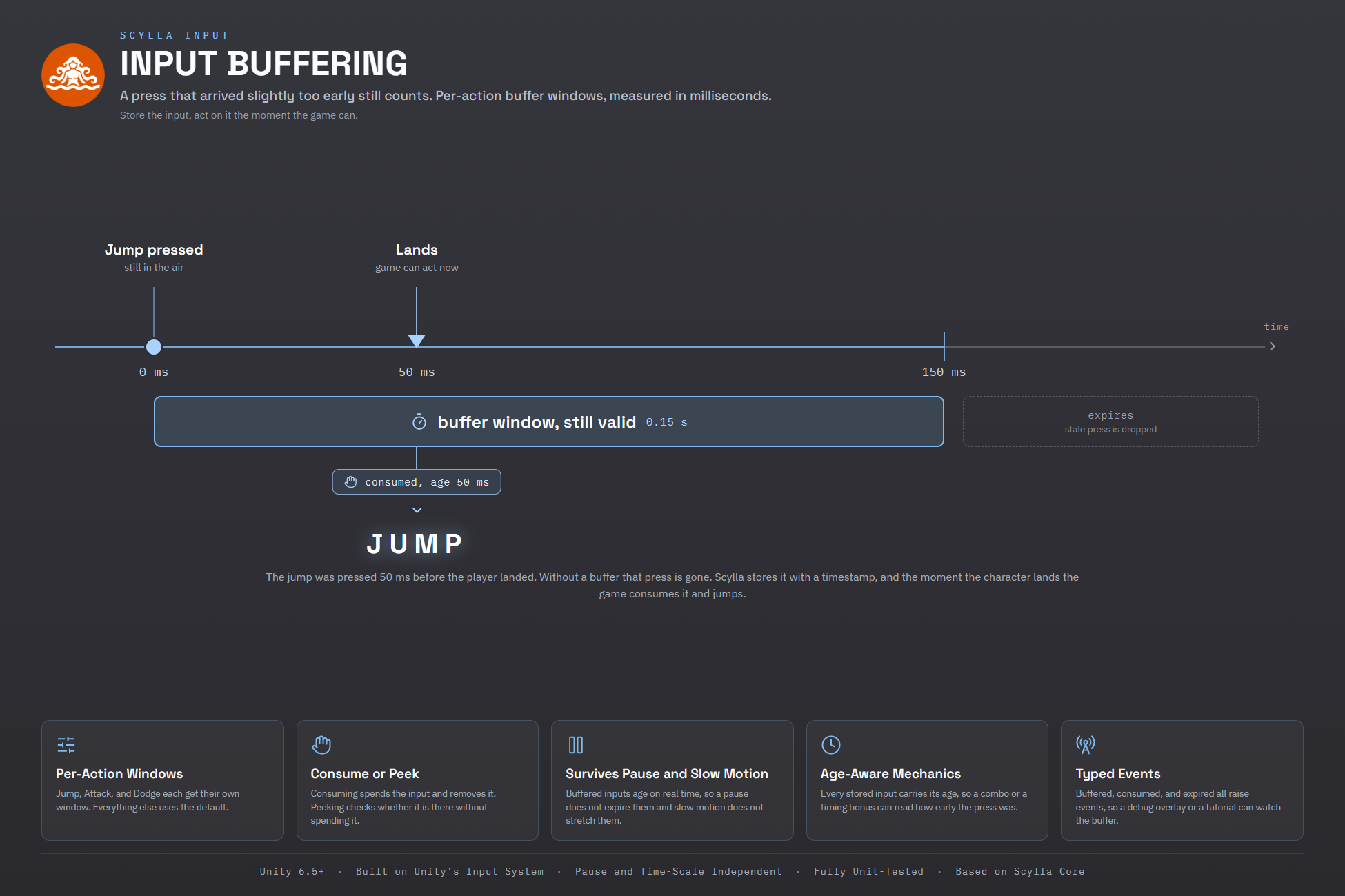
Scylla Input is a tier 1 module and has the task of managing any sort of user input-related work. This includes:
- Managing user input comping from supported input devices in the most efficient way and providing these to the rest of Scylla and of course to your game.
- Creating and managing input contexts that can be used to limit input to different layers and areas of a game, for example menu screens, pause screens, the debug console, the gameplay, etc.
- Runtime rebinding: A full rebind workflow for player settings screens, with conflict detection, and modifier-aware capture.
- Input buffering
- Control-scheme detection
- Button-prompt hints
- Action management
- Config and tooling
- And Scylla’s own Input Actions editor which lets you manage input schemes, actions and bindings, input contexts, and input layout. You may want to forget Unity’s default input action editor after using this!
Scylla Chroma


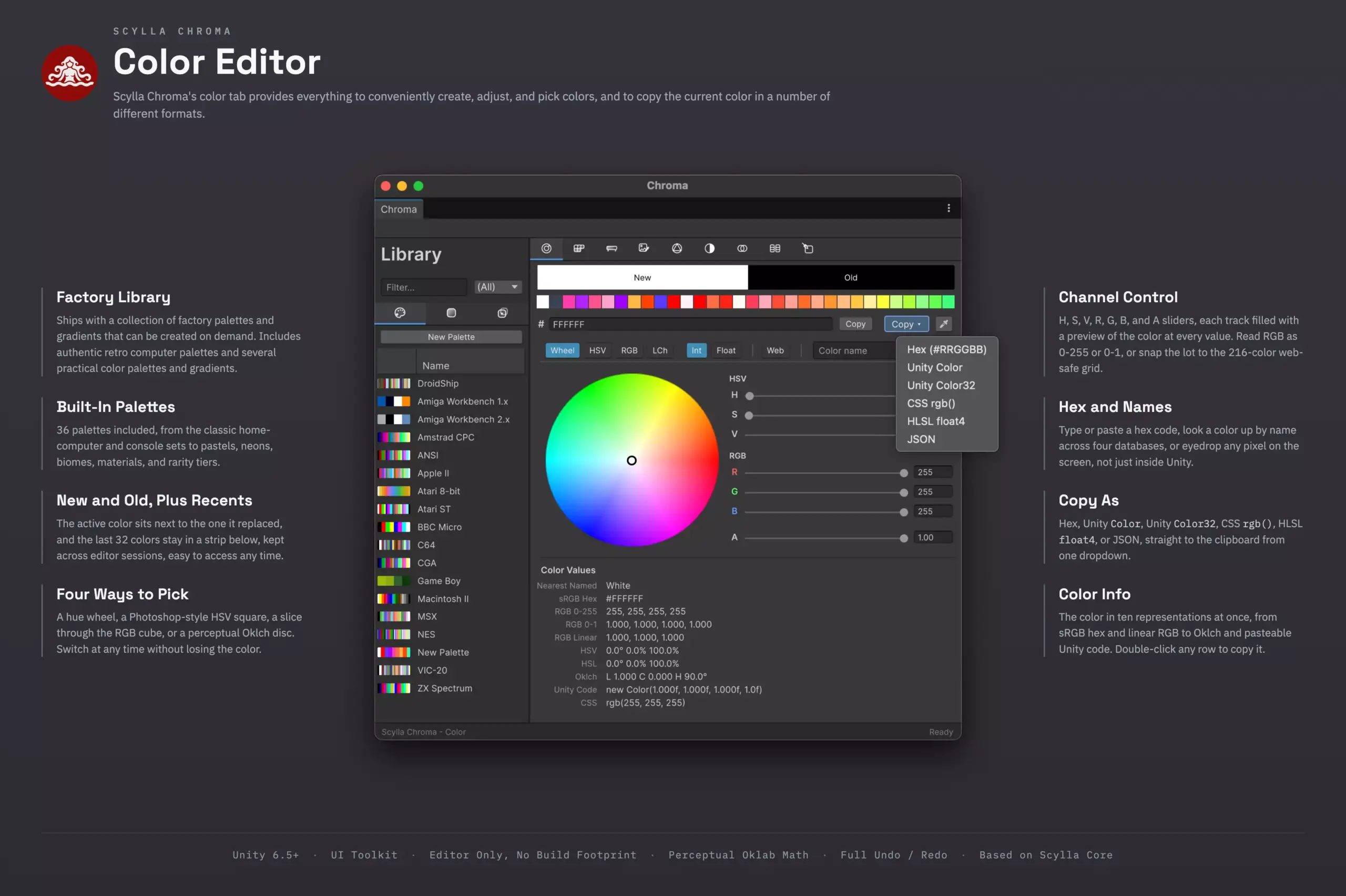


Scylla Chroma is an editor tool for color palette- and gradient management. Not only that but it integrates right with Scylla Core’s palette and gradient types that can be loaded into a game. This is easily the Swiss army knife of color managers. It features:
- Color editor: Four interchangeable 2D pickers (HSV wheel, HSV square, RGB cube slice, Oklch LCh plane), channel sliders in integer or float, hex in and out, alpha, and a live readout across every color space at once. A color name field resolves to the nearest named color, a screen eyedropper, a recent-colors history, and one-click copy as hex, Unity Color or Color32, CSS, HLSL float4, or JSON. A web-safe toggle posterizes everything to the old 216-color grid on the rare day you need it.
- Color library: Every palette, gradient, and swatch collection in your project, in one searchable sidebar with table previews and drag-and-drop. Double-click any color asset in the Project window and it opens right here.
- Palettes that behave like a database: A swatch grid and a sortable table, side by side. Multi-select, drag to reorder, batch edits, tags, lock flags, and semantic roles. Sort by hue, saturation, lightness, chroma, or alpha. Copy a whole selection out as text in any of the six formats.
- A gradient editor that goes well past the built-in one: Smooth or stepped, in RGB, HSV, or perceptual Oklab (the built-in editor stops at RGB). A separate alpha rail with its own stops and easing. Per-stop easing from fifteen easing curves, per-stop blend modes, midpoint handles, and a non-destructive Reduction slider that thins a dense gradient without deleting anything until you commit. Bake to PNG, TGA, or EXR, convert to and from palettes, and go up to 4096 stops.
- Image sampling and extraction: Drop in a reference image and take colors from it: a single pixel under a magnifier, a region average, a freehand drag that becomes a gradient, or a motion-timed trace. Or let it pull a whole palette for you with one of four strategies (K-means in Oklab, median cut, luminance buckets, or most-saturated).
- Color theory without the guesswork: Harmonies worked out in Oklch (complementary, triadic, analogous, and the rest), tints, shades, and tones in Oklab, seeded random palettes, cel-shading tone sets, blackbody ramps, and noise-driven palettes where each color is a coherent step from the one before it.
- Color accessibility check: WCAG 2.1 contrast with the AA and AAA badges, eight colorblindness simulations, Oklab delta-E between any two colors, nearest-named lookup across CSS Level 4, X11, and RAL, correlated color temperature, and per-palette statistics.
- Compare and recolor: Diff two palettes by nearest-entry Oklab distance, or remap a texture from one palette to another in Oklab and save the result as a PNG.
- Palette import: Import palettes from ASE, GPL, ACT, Lospec JSON, hex lists, and Chroma’s own format; export to those plus CSS and a ready-to-paste C# file. Gradients round-trip through Chroma’s format and import from Photoshop .grd, both the legacy and modern layouts, multi-gradient files included.